
Just tell your AI what to do
No dashboards. No complicated settings. Just a conversation.
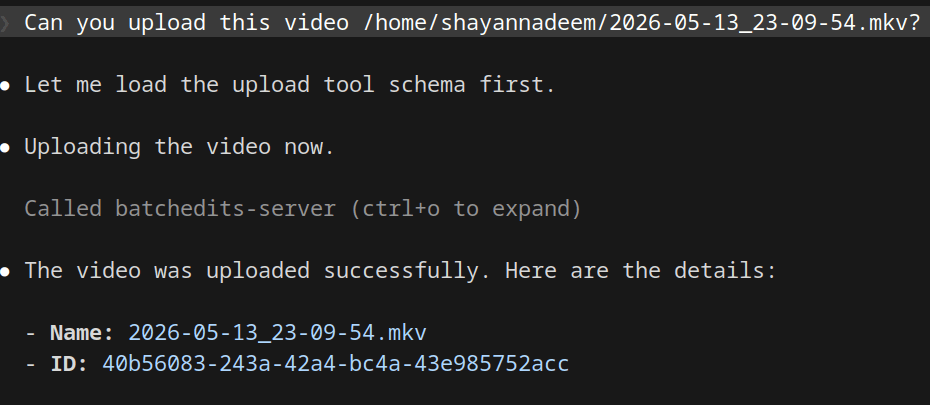
Upload my latest vlog video at /Users/me/Downloads/vlog.mp4
Done. Your video has been uploaded to BatchEdits and is ready for editing.
List all my available editing styles
You have 3 available styles: Cinematic, TikTok Viral, and YouTube Standard.
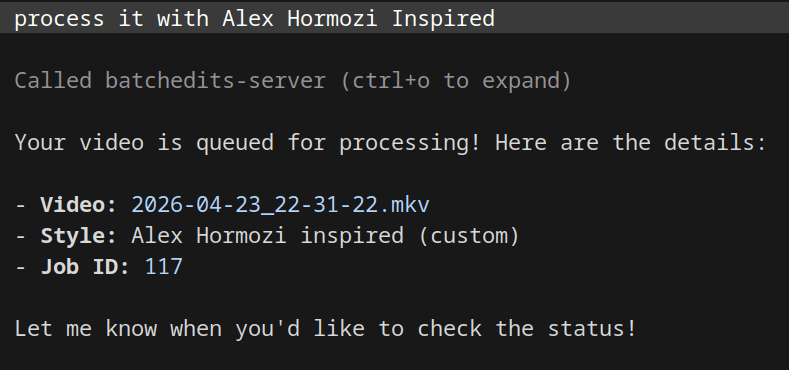
Apply the TikTok Viral style and queue it for processing.
Queued! Your video is now being processed in the background. You'll be notified when it's ready.
Check the status of my uploaded videos.
You have 1 video currently processing and 5 completed videos in your workspace.
Setup in 3 Steps
Get up and running in under a minute.
Add the MCP server
In Claude or ChatGPT, add a custom connector with https://batchedits.com/api/mcp and sign in with your BatchEdits account.
Or use an API key
For Cursor, Windsurf or scripts, create an API key in Dashboard → Settings and drop this snippet into your MCP settings.
Start Automating
Ask your AI to upload videos, list styles, and queue editing tasks.
{
  "mcpServers": {
    "batchedits": {
      "type": "http",
      "url": "https://batchedits.com/api/mcp",
      "headers": {
        "x-api-key": "your_api_key_here"
      }
    }
  }
}
No local install needed — connects directly to the BatchEdits API over HTTP.
Everything you need, right in chat
Our MCP integration exposes the core bulk editing workflow to your AI.
Upload Videos
Pass local file paths directly to the AI, and it will upload them securely to your BatchEdits workspace.
Fetch Styles
The AI can instantly retrieve your custom editing styles and parameters from your account.
List Videos
Ask your AI to check the status, duration, and details of all your previously uploaded videos.
Queue Processing
Link a video to a specific style and dispatch it to the background processing queue with one prompt.
Got Questions? We've Got Answers.
What is an MCP video editor?
An MCP video editor exposes its editing features through the Model Context Protocol (MCP), so AI assistants like Claude and ChatGPT can upload videos, apply editing styles and check progress for you from a chat. BatchEdits is a bulk video editor with its own MCP server.
Which AI assistants work with the BatchEdits MCP server?
Claude (web, desktop and mobile), ChatGPT, Claude Code, Cursor, Windsurf and any client that supports remote MCP servers over Streamable HTTP. Claude and ChatGPT connect with OAuth sign-in; other clients can use an API key.
Can the AI upload and edit videos through MCP?
Yes. The upload_videos tool opens the BatchEdits uploader in the chat (or uploads a file you attached in ChatGPT), process_video applies one of your styles, list_videos reports the real status, and download_videos returns links when a video is completed.
How much does the BatchEdits MCP server cost?
The MCP server is included in every BatchEdits account. Processing uses the same video credits as the web app: 10 in the 7-day free trial, then 30 per month on Creator Starter.
What is the BatchEdits MCP server URL?
https://batchedits.com/api/mcp. Add it as a custom connector in Claude or ChatGPT and sign in, or send an API key in the x-api-key header from other MCP clients.